跳到主内容
AI workflow for short-form video

Ideas, scripts, captions, covers in one place

so you can spend more time shooting

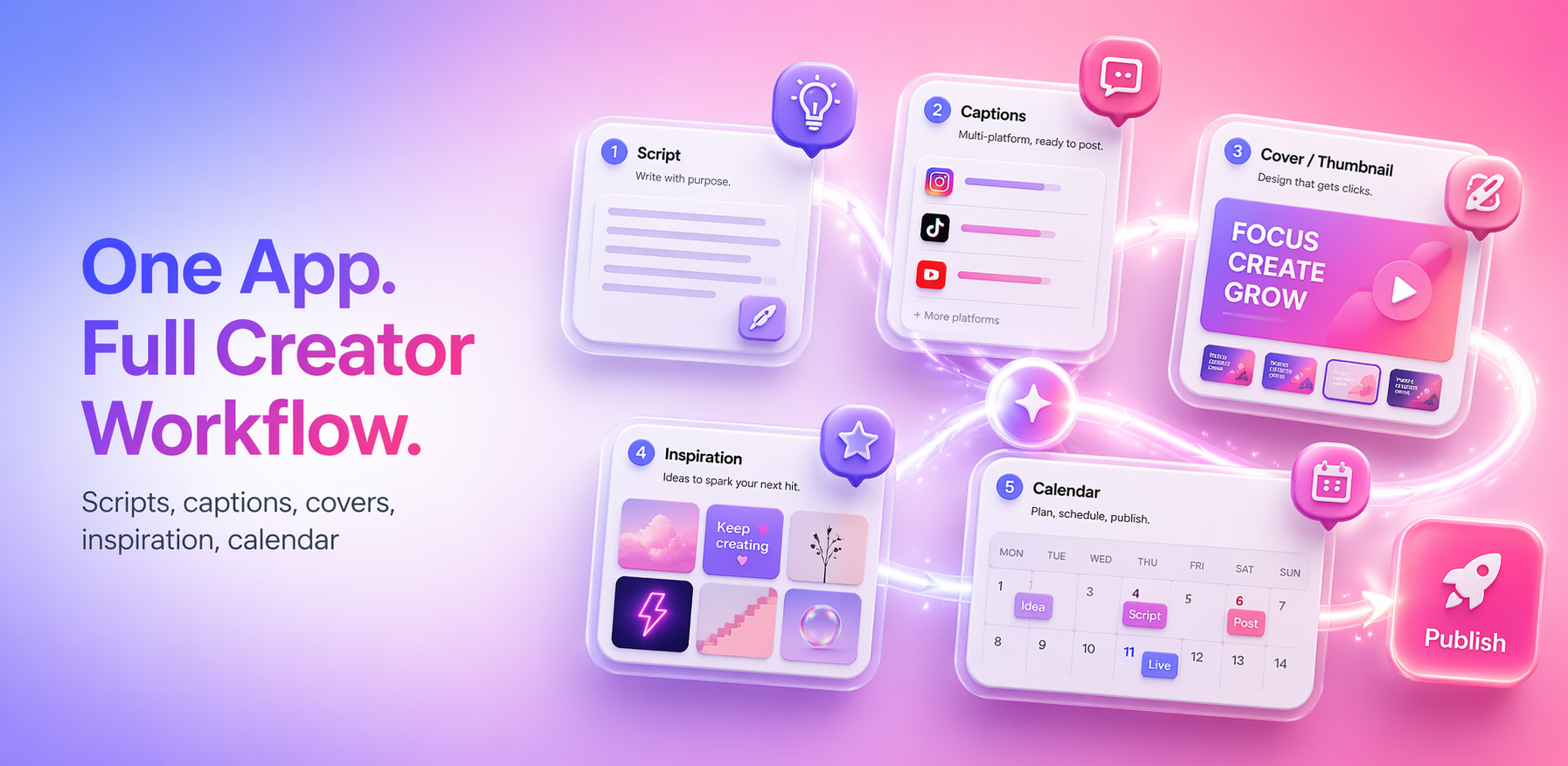
CreatorKit puts AI at every step: 5 fresh ideas a day → a one-line topic into a full script → platform-aware caption rewriting → cover composition & color suggestions → a content calendar to plan your week. All powered by one shared quota — clean and predictable.

iOS 17+ · Android 8.0+ · English & Chinese

CreatorKit overview: scripts, captions, covers, inspiration, calendar
5.0 / Beta
Built by an indie creator · Launched May 2026 · iOS & Android

What early-access creators are saying

What used to take me two hours — picking a topic, drafting a script, rewriting captions — now takes 30 minutes. One app, one flow.
Beta tester · A · Food vlogger
The cover suggestions surprised me. I expected a text tool, but I got composition, palette, and text hierarchy I can drop straight into CapCut.
Beta tester · B · Fitness coach
The shared quota is the cleanest pricing I've seen. I stop second-guessing model picks and just plan a week of posts.
Beta tester · C · Edu-tech creator

What's live today

Five AI capabilities covering one full short-form video — from idea to scheduling.

Live

AI idea curation

Five fresh, shootable topics every day with angle, difficulty, and visual hints. No more "what should I shoot today?".

Live

AI script generation

From a topic to a full short-form script with shot rhythm in 30 seconds — copy straight into your teleprompter.

Live

AI caption optimizer

Rewrite your post copy for TikTok, YouTube Shorts, Reels, Douyin, or Xiaohongshu — tone and length tuned per platform.

Live

AI cover suggestions

Give a topic, get composition, color palette, text hierarchy, and mood guidance — pair with your favorite editor to ship.

Live

Content calendar

Drop ideas and scripts onto a calendar to pace your weekly / monthly cadence and keep the channel from stalling.

Is this for you

Four creator profiles already shipping with it

Different creators solve different blockers with CreatorKit. Pick the closest profile.

Skit / scripted channel creators

Where they get stuck

Idea fatigue, slow shot-list drafting, off-beat hook timing, repetitive caption rewriting across platforms.

How CreatorKit fixes it

Daily AI idea list + 30-sec script generation (with shot rhythm) + one-click caption rewriting; AI hooks and beats baked in.

Download and try

Food / lifestyle vloggers

Where they get stuck

Nothing to say before shooting, plain-looking covers, no plan for the rest of the week.

How CreatorKit fixes it

Idea cards with visual hints and difficulty → AI cover composition & palette → drop into the calendar to pace the week.

Download and try

Fitness / vertical expert channels

Where they get stuck

Expert content sounds too written for the feed, mass-market hooks are hard, series content lacks a backbone.

How CreatorKit fixes it

AI caption optimizer rewrites for tone per platform → idea curation surfaces accessible angles → calendar threads a series backbone.

Download and try

Edu-tech / explainer creators

Where they get stuck

Script must balance info density and viral pacing; cover text hierarchy doesn't grab the eye; not sure how to rewrite for each platform.

How CreatorKit fixes it

AI script with shot rhythm + hook points → cover suggestions for text hierarchy & mood → captions tailored for Shorts / Reels / Xiaohongshu / Douyin.

Download and try

Three steps from idea to schedule

Around one topic, AI links script, caption, cover, and calendar.

01

Pick a topic

Open the app, see today's 5 curated ideas, hit "Create with this".

02

Generate

Script, caption, and cover suggestions follow — rewrite, copy, or restyle anytime.

03

Schedule

Drop the ready piece onto the content calendar and ship one a day. All AI calls share the daily / weekly quota.

Roadmap

On the way

Heavier visual generation is rolling out next. Pro subscribers get early access.

Coming soon

AI image generation

Turn cover suggestions into actual cover images — people, scene, and text layers in one shot.

Coming soon

AI video generation

From a script segment to a video clip or transition — tying script and caption into the full pipeline.

Coming soon

AI voiceover & captions

Multi-language multi-voice voiceover, auto-segmented and beat-synced captions — studio-grade output for solo creators.

Want early access? Use any live feature on Pro and you're auto-enrolled in the early-access list.

Simple, honest pricing

Subscriptions are processed by App Store / Google Play. Cancel anytime. Prices in USD.

Shared quota pool All AI features (Ideas, Script, Caption, Cover, Calendar) share one daily + weekly pool. The table below shows each tier's allowance.

Free

Try the basics

$0 / free forever
  • 3 AI generations / day
  • 15 AI generations / week
  • All live capabilities
  • English & Chinese UI
Get started
Recommended

Pro Monthly

The steady creator's pick

$9.99 / month
  • 20 AI generations / day
  • 100 AI generations / week
  • All live capabilities
  • Early access to image & video gen
  • Priority email support

Also available weekly at $2.99 (10/day, 50/week) for short bursts

Get started

Pro Yearly

Best value for year-round shipping

$79.99 / year (~$6.66/mo, save 33%)
  • 40 AI generations / day
  • 200 AI generations / week
  • All live capabilities
  • Early access to image & video gen
  • Priority email support
Get started

Pro Weekly $2.99 (10/day, 50/week) is also available for short bursts — pick it on the in-app paywall.

Frequently asked

01How does the AI quota work?

All AI features (Ideas, Script, Caption, Cover, Calendar) share one daily + weekly pool. Free: 3/day, 15/week. Pro Weekly: 10/50. Pro Monthly: 20/100. Pro Yearly: 40/200. Daily window resets at local midnight; weekly window resets on local Monday midnight.

02How do I cancel my subscription?

iOS: Settings → Apple ID → Subscriptions. Android: Play Store → Profile → Payments & subscriptions. Cancellation takes effect at the end of the current billing period; Pro quota stays usable until then.

03Can I request a refund?

iOS: file at reportaproblem.apple.com. Android: open the order in Google Play. We honor Apple / Google's refund rules and do not double-charge.

04Who owns AI-generated content?

Within compliant use, you own the AI-generated scripts, captions, and cover suggestions. See Section 5 of the Terms of Use for the licensing details.

05When will image / video generation ship?

No public ETA yet. We notify Pro subscribers 1–2 weeks before launch via in-app notice + email; the public update lands in the Roadmap section.

Spend more time shooting

Download CreatorKit and plan this week's posts in the next 10 minutes.

iOS 17+ · Android 8.0+ · Billed by App Store / Google Play · Cancel anytime